Mint in 3 steps
For: anyone buying a Forked Feline, with or without Knot Heads. Goal: reserve, pay for, and receive one Forked Feline.
| Chain and network | Bitcoin mainnet |
| Pricing contract | forked-felines.community-remediation/v4 |
| Product contract | forked-felines.public-product/v5 |
| What you will approve | One Bitcoin payment, for one printed total. Nothing else |
| What it costs | 8,888 sats collection price (0 sats with a credit), plus the live network fee, 546 sats of delivery postage per Feline, and a 1,500-sat service fee on paid mints (0 sats when every Feline in the order uses a credit) |
| Before minting is possible | The house must be accepting orders. The mint page says so in plain words, and no wallet action is requested when it is not |
Before you start
- A Bitcoin address that can receive an inscription. A Taproot address from a wallet that understands Ordinals is the usual choice. See Supported wallets.
- Enough sats to cover the total the site will quote you: the collection price (8,888 sats public, 0 sats with a Knot Heads credit), the live Bitcoin network fee, inscription delivery, and the 1,500-sat service fee on a paid mint. An order made only of credits pays no service fee.
- You do not need to connect a wallet to see any of this. The full offer, both posted rates, and the live mint status are on the page before any wallet prompt.
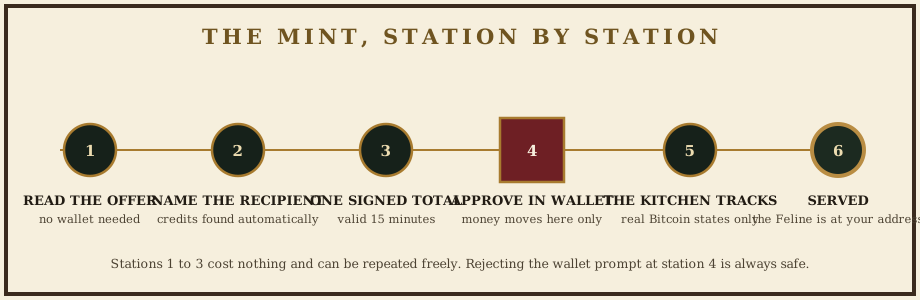
Step 1: open the bar and read the offer
If you arrive at the front door, forkedfelines.art, you may be met by the house doors once per visit: a plaque that reads THE HOUSE IS OPEN and one button, OPEN THE DOOR. Press it, press Enter, or choose ENTER WITHOUT ANIMATION to walk straight in. The doors are decoration: they ask for nothing, they never open a wallet, and every direct link, including the mint page below, skips them entirely. If your device asks for reduced motion, or your browser runs no scripts, you will not see them at all.
Open forkedfelines.art/mint. The page states whether the house is currently serving, the posted rates, and how many felines remain. If minting is unavailable, the page says so in plain words and no wallet action will be requested from you.
Step 2: say where the Feline should go
Enter the Bitcoin address that should receive the Feline, or connect a wallet to fill the field for you. Two things happen:
- The house checks that address against the fixed Knot Heads guest list at block 963,238. Any unused free-mint credits are found and applied automatically.
- The table card shows which rate your next mint gets.
Connecting a wallet only fills the recipient field and offers an address chooser. It does not authorize a payment, and it is never required: you can type any address you control.
Step 3: review one exact total, then pay
Choose your quantity and a network fee rate. The house prints a signed quote: collection price, Bitcoin network fee, inscription delivery, and service fee (0 sats when the whole order is credited), summed into one exact total. That quote is signed by the server and valid for 15 minutes.
Choose Pay with Wallet. Your wallet shows a payment for exactly the quoted total to the address printed on the bill. Approve it if it matches. Nothing else is requested: no message signing, no token approvals, no second transaction.
Expected result: the kitchen ticket appears and tracks every real state: payment seen, payment confirmed, inscribing, broadcast, confirmed, served. Each state reflects what actually happened on Bitcoin; the site never animates progress the chain has not made. When the ticket reads SERVED, the Feline is at your address and hangs in My Booth.
Common problems
| Problem | What to do |
|---|---|
| The quote expired before I paid | Quotes last 15 minutes. Request a fresh one; every component is recalculated and re-signed. Nothing was charged. |
| My wallet rejected the request | Your reservation is unchanged. Choose Pay with Wallet again before the order expires. |
| I closed the browser after paying | Open My Booth and look up your recipient address. Your order and its live state are there. Payment tracking continues on the server whether or not your browser is open. |
| Payment is taking a while | Bitcoin confirmation times vary with the fee rate you chose. See Payment and confirmation. |
Next
- Understand exactly what you are approving: Wallet signing
- Track the order afterwards: Order status